Integrated and advanced image converter for personal computers

Picture Converter is a software package which performs the exact same actions as its title suggests. This application allows individuals to change the output format of an image in order to accommodate the needs of the user. It offers many more options than are normally encountered through standard programs such as Windows Photo Viewer. However, the bundle is still very lightweight in terms of memory usage. It is designed to be used with most personal computers.

Top Recommended Alternative

Basic Functions and Options

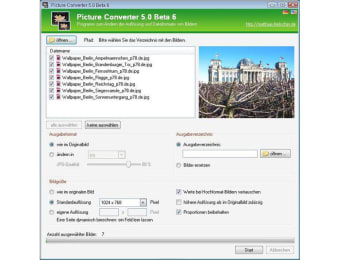
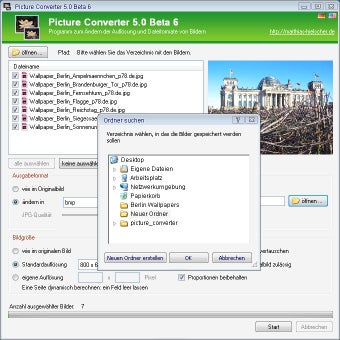
Picture Converter provides users with a four-step process. First, the folder which contains the images will be selected and opened. The image in question will then be highlighted. After choosing the output format and destination folder, the resolution will be selected. Finally, the conversion process itself will begin. When it is finished, the new image is sent to the chosen folder. It can also be viewed immediately if required.

Other Functions

Picture Converter is available in both English and German. It is possible to scale up the resolution of an existing image if greater clarity is desired. Some of the file types which can be converted include JPEG, JPG, PNG and BMP. Finally, users can opt to convert a batch of images simultaneously. This can be useful for larger projects.

More about Picture Converter

  • Pros

    • This program is very easy to work with
    • It can be a valuable replacement to larger bundles such as Adobe Photoshop
  • Cons

    • The last updated occurred as far back as 2010
    • Some newer file types are not supported by this package
 0/2

App specs

  • License

    Free

  • Version

    5.0

  • Latest update

  • Platform

    Windows

  • OS

    Windows 8

  • Language

    English

    Available languages

    • German
    • English
  • Downloads

    134.7K

  • Size

    608.78 KB

  • Developer

Program available in other languages


User reviews about Picture Converter

Have you tried Picture Converter? Be the first to leave your opinion!

Add review

You may also like

Alternatives to Picture Converter

Explore Apps

Latest articles

Laws concerning the use of this software vary from country to country. We do not encourage or condone the use of this program if it is in violation of these laws.
Softonic

Is Picture Converter safe?

100/100

Score result: Clean

This file passed a comprehensive security scan using VirusTotal technology. It is safe to download.

  • Virus free
  • Spyware free
  • Malware free
  • Verified by Security Partners

    VirusTotal logo

Scan Info

Last scan
Wednesday, November 25, 2020
Scan provider
VirusTotal · Full report

File Integrity

File
PictureConverter_5b8.zip
SHA256
86ed31b8fb6d44c4fc70365e51a52efaca4243901dfac65856e4333491f5bddd
SHA1
06fe8482aa0dfceb66af8f849073c4c16cb89e5e

Softonic security commitment

Picture Converter has been thoroughly scanned by our advanced security systems and verified by industry-leading partners. This file comes from the official developer and has passed all our security checks, showing no signs of viruses, malware, or spyware. For more information, visit our Security and Trust Center